
This is Part 3 of the Denial of Wallet series. Part 1 introduced Denial of Wallet as a distinct failure mode in GenAI applications. Part 2 compared rate limiting algorithms and provided a practical implementation checklist. This post delivers a hands-on implementation: a working API with multi-level rate limiting, Redis-backed quota management, real-time monitoring dashboards, and load testing scenarios that demonstrate how the system behaves under different attack patterns.
Introduction
As hands-on architects, we couldn't just write theoretical articles about protecting GenAI APIs from Denial of Wallet attacks. We needed to build a working example that you can run, modify, and learn from. This post walks through a complete implementation that demonstrates:
- Token Bucket Rate Limiter - Allows controlled bursts while maintaining average rate (minute-level protection)
- Daily Quota - Short-term quota that prevents sustained abuse within 5-hour windows
- Weekly Quota - Long-term quota that prevents extended exploitation over 7-day periods
The implementation is built for educational purposes using accelerated timeframes (5-minute "daily" and 20-minute "weekly" quotas) so you can observe the full behavior in under 30 minutes rather than waiting days. This architecture is inspired by Claude's current rate limits, which implement three levels of protection: requests per minute, 5-hour window quotas, and weekly window quotas.
The full project code is available at: https://github.com/handsonarchitects/denial-of-wallet-demo
Note on Terminology
Throughout this post, "tokens" refer to budget units for rate limiting, not LLM model tokens:
- 1 budget unit = $0.001 (one-tenth of a cent)
- A $0.50 LLM request consumes 500 budget units
- The token bucket "24 tokens" means $0.024 in budget, not 24 LLM tokens
See Part 2 for the full terminology mapping and cost calculation formulas.
Demo Enhancements for Learning
This implementation includes additional logging and observability features for educational clarity:
- Explicit "cascading limit detected" messages in k6 logs
- Real-time dashboard with 10-second metric snapshots
- Accelerated quota windows (5 min "daily", 20 min "weekly")
In production, you'd replace these with your standard observability stack (e.g., Prometheus, Grafana, CloudWatch).
Application Architecture
The API is built with FastAPI and follows a clean architecture pattern with clear separation of concerns. Let's examine the core components and request lifecycle.
Core Components
Dependency Injection: FastAPI's built-in DI system provides RateLimiter, RedisStorage, and Settings to endpoints via app.state. This enables clean testing and makes it easy to swap implementations.
Token Bucket: Implements the continuous refill algorithm for smooth minute-level rate limiting. Unlike discrete interval-based approaches, tokens accumulate proportionally based on elapsed time, providing more granular burst control.
Quota Manager: Handles time-windowed daily and weekly quotas with automatic reset logic. Each quota tracks consumption independently and resets at configured intervals.
Metrics Recorder: A background task that periodically captures state snapshots (bucket levels, quota remaining, request success/failure rates) for historical analysis and dashboard visualization. This component is done for educational purposes; in production, you'd integrate with your existing monitoring solution.
Storage Layer: Redis-backed persistence for all state: token buckets, quotas, metrics snapshots, and request history. Redis provides atomic operations and expiration support, making it ideal for distributed rate limiting.
Request Lifecycle
The following sequence diagram shows how a request flows through the rate limiting system. In this demo, generation time (0.1-0.5s) and actual cost (1-5 budget units) are simulated randomly to mimic real LLM variability. In production you would use the LLM proviter's usage metadata (e.g., prompt_tokens + completion_tokens) to determine actual cost after generation and use SDK tools to estimate cost beforehand.
Key Design Patterns
Cost Estimation Strategy: Before calling the LLM, the system estimates cost based on input tokens and expected output length. In this demo, costs are randomly simulated (1-5 budget units) to mimic real-world variability. In production implementations, cost estimation uses:
- Input token count from prompt tokenization
- Maximum output tokens from the
max_tokensparameter - Per-model pricing catalog (e.g., GPT-4o: $2.50/1M input tokens, $10.00/1M output tokens)
For example: a prompt with 800 input tokens and max_tokens=300 would estimate (800 × $2.50/1M) + (300 × $10.00/1M) = $0.005 = 5 budget units. See Part 2's Token Bucket section for detailed cost calculation formulas.
Optimistic Locking: The system pre-consumes the estimated cost before processing the request, then refunds the difference after determining actual generation cost. This prevents race conditions while ensuring accurate accounting.
Rollback on Failure: If any quota check fails (daily or weekly), previously consumed tokens are refunded to the minute bucket to maintain consistency. This ensures that a failed request due to quota exhaustion doesn't also consume the minute-level tokens.
Continuous Refill: The token bucket adds tokens proportionally based on elapsed time rather than discrete intervals. The bucket stores a last_refill_timestamp in Redis; on each request, the system calculates elapsed time and adds tokens accordingly (e.g., if 60 seconds elapsed at 6 tokens/minute, exactly 6 tokens are added; if 30 seconds elapsed, 3 tokens are added).
Background Metrics: An async task records snapshots every 10 seconds for historical trending without blocking requests. This enables the real-time dashboard to show rate limit state over time.
Rate Limiting Architecture
The implementation uses three complementary layers of protection, each serving a distinct purpose in preventing Denial of Wallet attacks:
1. Minute Bucket (Token Bucket)
- Capacity: 24 tokens (maximum burst size)
- Refill Rate: 6 tokens/minute (sustained rate limit)
- Purpose: Prevents rapid successive requests that could quickly exhaust quotas
This layer allows legitimate bursts (like an agentic workflow spawning multiple LLM calls in quick succession) while maintaining a long-term average rate. The bucket can accumulate up to 24 tokens during idle periods, enabling users to burst above the steady-state 6 tokens/minute rate briefly.
2. Daily Quota (Short-term)
- Total: 40 tokens per window
- Reset Window: 5 minutes (demo) / e.g. 24 hours (production)
- Purpose: Limits sustained usage within short periods
This quota prevents scenarios where a user stays just below the minute-level rate but maintains that usage continuously, consuming far more than intended over hours.
3. Weekly Quota (Long-term)
- Total: 100 tokens per window
- Reset Window: 20 minutes (demo) / 7 days (production)
- Purpose: Prevents extended abuse over long periods
The weekly quota is the ultimate cost ceiling. Even if a user carefully paces requests to avoid minute and daily limits, they cannot exceed 100 tokens per week. This provides predictable budget protection.
Hierarchical Enforcement
The three layers are checked in sequence: minute bucket → daily quota → weekly quota. A request must pass all three checks to proceed. This creates a cascading protection model where exhausting the weekly quota blocks requests even when daily quota resets. We'll see this behavior demonstrated in Scenario 3.
Scenarios
We've developed three load testing scenarios using k6 to demonstrate how the rate limiting system behaves under different usage patterns. Each scenario automatically resets the system state at the start to ensure consistent results.
You are welcome to clone the repository and run these scenarios yourself. All necessary instructions are provided in the README of the denial-of-wallet-demo.
Scenario 1: Short Bursts
Duration: 6 minutes
This scenario shows how the system handles burst traffic that stays comfortably within all rate limits.
Traffic Pattern:
- First burst (1 min): 10 requests at 1 request per 6 seconds
- Pause (4 min): No requests - token bucket refills naturally
- Second burst (1 min): 10 requests at 1 request per 6 seconds
Expected Behavior:
- 100% success rate (all 200 responses)
- Token bucket fluctuates between bursts but never exhausts
- Daily and weekly quotas decrease gradually (~40 tokens consumed total)
- Dashboard shows smooth green metrics throughout
Demonstration:
The dashboard after completing Scenario 1 shows healthy quota levels across all three tiers. The minute bucket recovered fully during the 4-minute pause between bursts, demonstrating the continuous refill behavior. Daily quota dropped from 40 to 19 tokens (21 consumed), and weekly quota from 100 to 54 tokens (46 consumed).
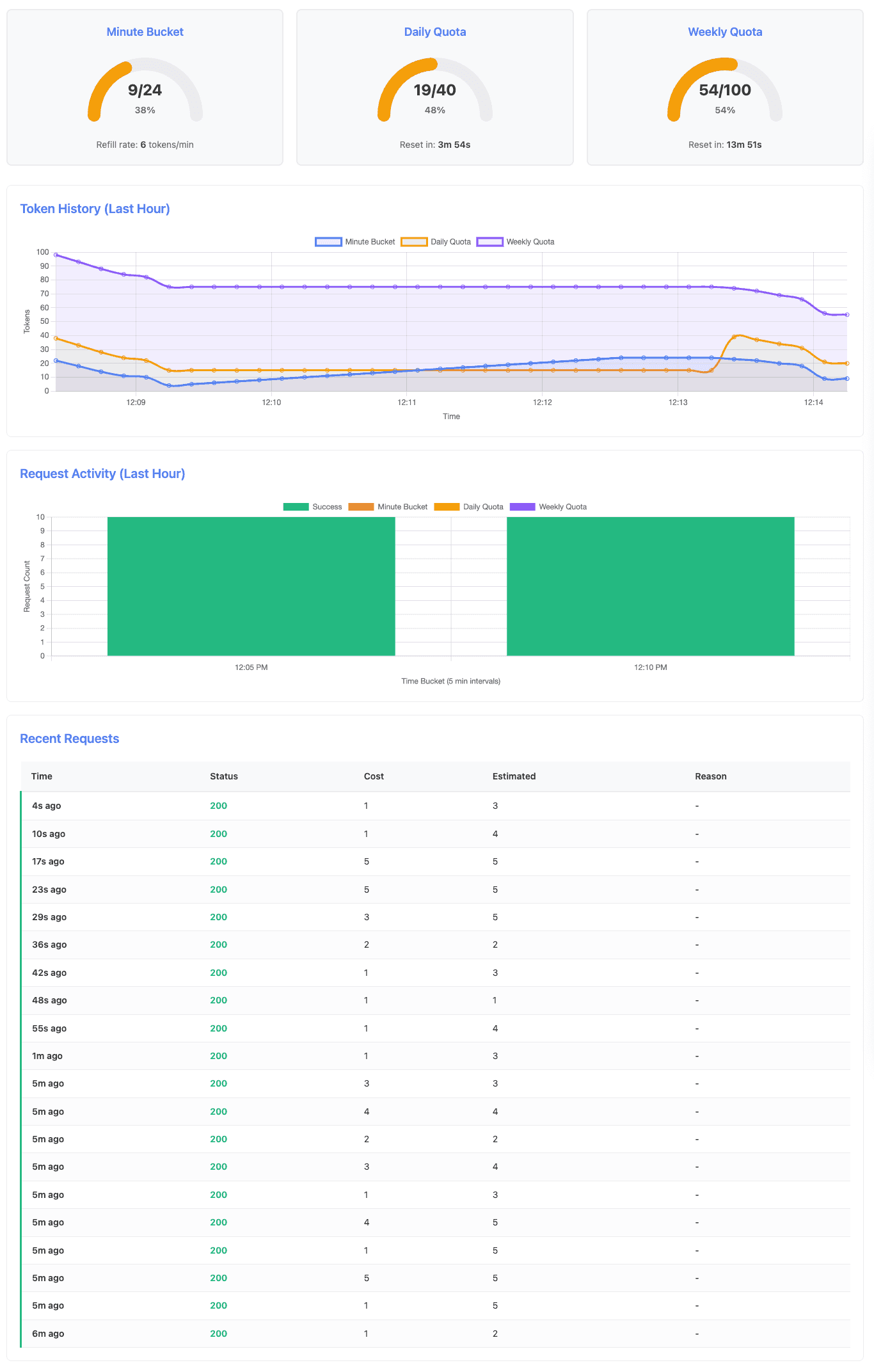
Key observations from the k6 log output:
INFO[0000] Transitioning to stage: FIRST_BURST
INFO[0056] Success - Daily: 15, Weekly: 75, Cost: 3
INFO[0062] Transitioning to stage: WAIT
INFO[0302] Transitioning to stage: SECOND_BURST
INFO[0303] Success - Daily: 39, Weekly: 74, Cost: 1
INFO[0360] Success - Daily: 19, Weekly: 54, Cost: 1
Notice that at the second burst (second 303 -> ~5th minute), the daily quota has reset from 15 back to 39 tokens - the 5-minute daily window reset occurred during the 4-minute wait period. This demonstrates automatic quota recovery.
Key Learning: Token bucket handles burst traffic gracefully and refills during idle periods. The continuous refill algorithm ensures smooth rate limiting without artificial request delays.
Scenario 2: Daily Quota Exhaustion
Duration: 8 minutes
This scenario shows what happens when sustained traffic depletes the daily quota while the weekly quota remains healthy.
Traffic Pattern:
- Exhaust phase (5 min): Steady requests at 5 requests/minute (12s intervals)
- Wait phase (1 min): Continue requests to monitor exhaustion state
- Recovery phase (2 min): Verify quota reset and recovery
Expected Behavior:
- Initial requests succeed (~20 requests consuming ~40 tokens)
- Daily quota exhausts, 429 responses begin with
daily_quota_exceededreason - At 5-minute mark: Daily quota automatically resets to 40 tokens
- Requests succeed again after reset
- Weekly quota remains healthy throughout (consumed less than 100 tokens throughout the scenario)
Demonstration:
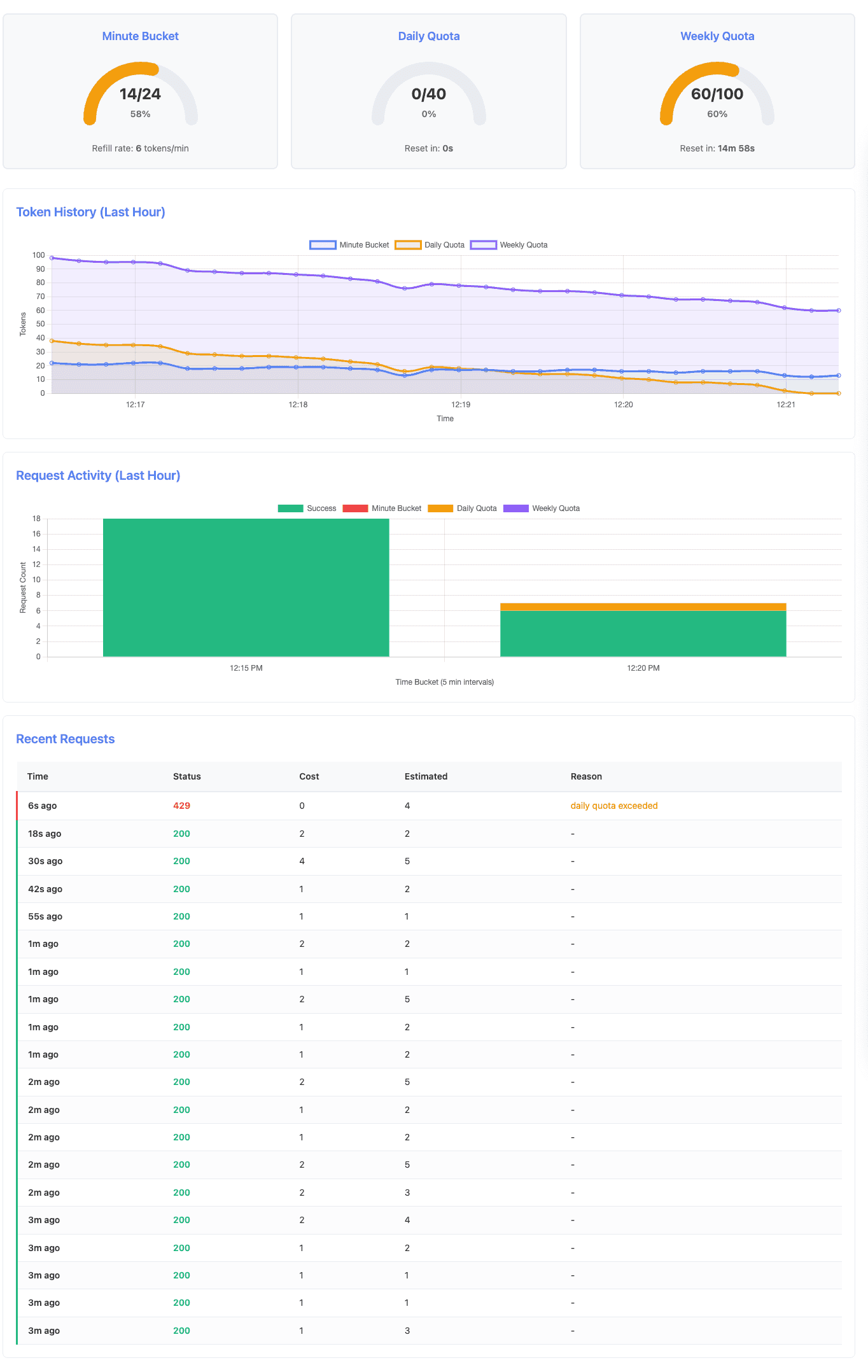
After 5 minutes of sustained traffic, the daily quota is fully exhausted while the weekly quota still has capacity:
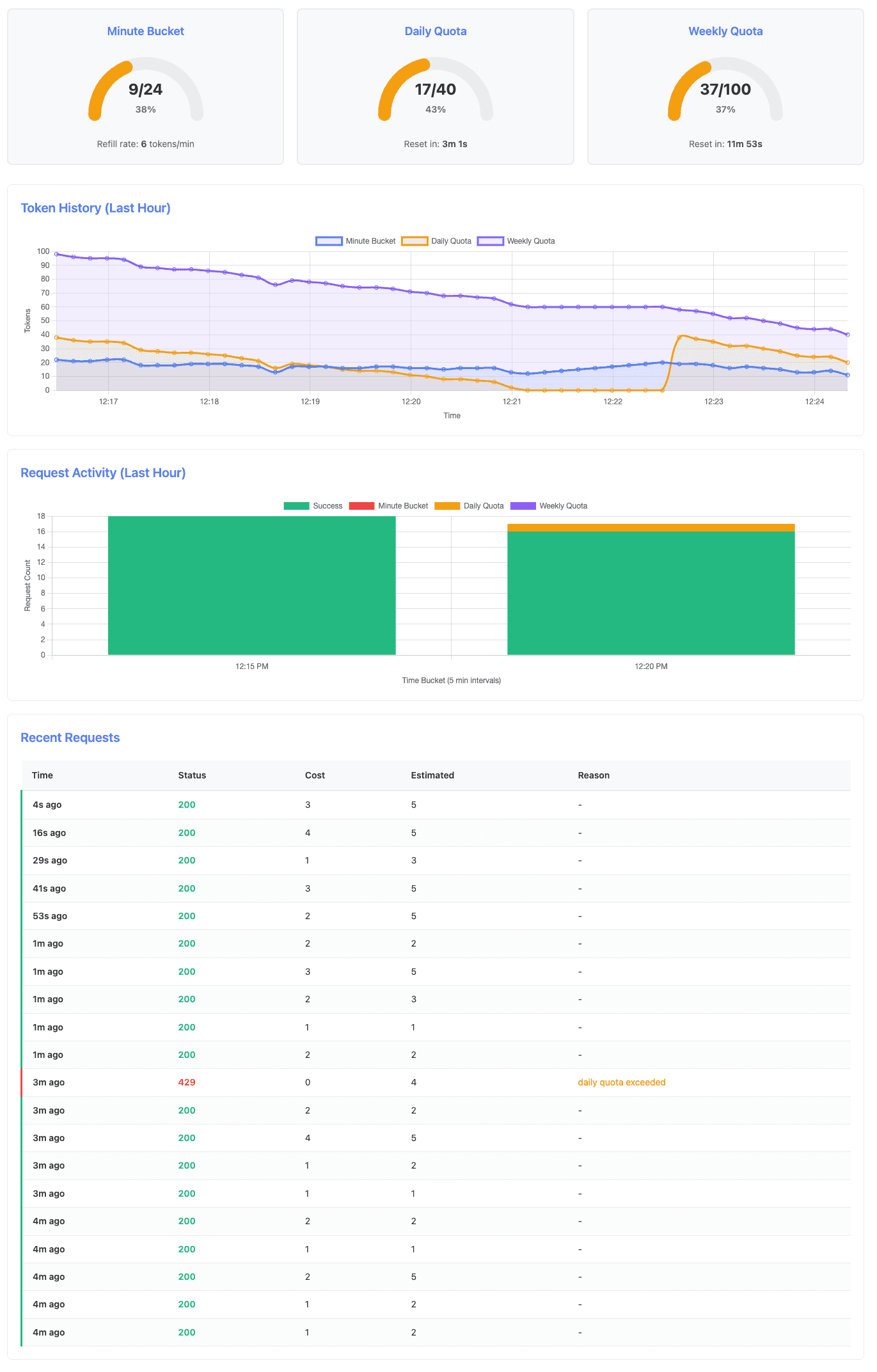
Near the end of the scenario, after the daily quota reset, requests succeed again:
Key observations from the k6 log output:
INFO[0283] Success - Daily quota remaining: 0, Weekly: 60, Cost: 2
INFO[0295] Daily quota - not enough tokens to process the request (left 0)
INFO[0307] Transitioning to stage: WAIT
INFO[0367] Transitioning to stage: RECOVERY
INFO[0367] Success - Daily quota remaining: 38, Weekly: 58, Cost: 2
At timestamp 0283 (~4:43 minute), the daily quota reaches zero while weekly quota has 60 tokens remaining. The next request (0295 -> ~4:55 minute) is rejected. After the 5-minute reset window passes, the recovery phase (starting at 0367 -> ~6:07 minute) shows the daily quota has reset to 40 tokens (38 after first request), and requests succeed again.
Key Learning: Daily quota limits provide short-term protection and automatically reset at configured intervals. The system gracefully rejects requests when quotas are exhausted and provides Retry-After headers to guide clients.
Scenario 3: Weekly Quota Exhaustion
Duration: 25 minutes
This is the most complex scenario. It shows how weekly quota enforcement persists even when daily quota resets multiple times, proving the hierarchical nature of the protection layers.
Traffic Pattern:
- Exhaust phase (19 min): Steady requests at 3 requests/minute (20s intervals)
- Wait phase (2 min): Continue requests to monitor weekly exhaustion
- Recovery phase (4 min): Verify quota reset and recovery
Expected Behavior:
- 0-15 minutes: Requests succeed, daily quota resets every 5 minutes (at 5, 10, 15 min marks)
- ~15-17 minutes: Weekly quota exhausts (~50 requests consuming ~100 tokens)
- ~17-21 minutes: Requests fail with
weekly_quota_exceededeven when daily quota resets - Cascading Limit Demonstration: Around the 20-minute mark, daily quota resets but requests STILL fail due to weekly exhaustion - this proves hierarchical enforcement
- ~21-minute mark: Weekly quota automatically resets to 100 tokens (20 minutes after test start)
- 21-25 minutes: Requests succeed again
Demonstration:
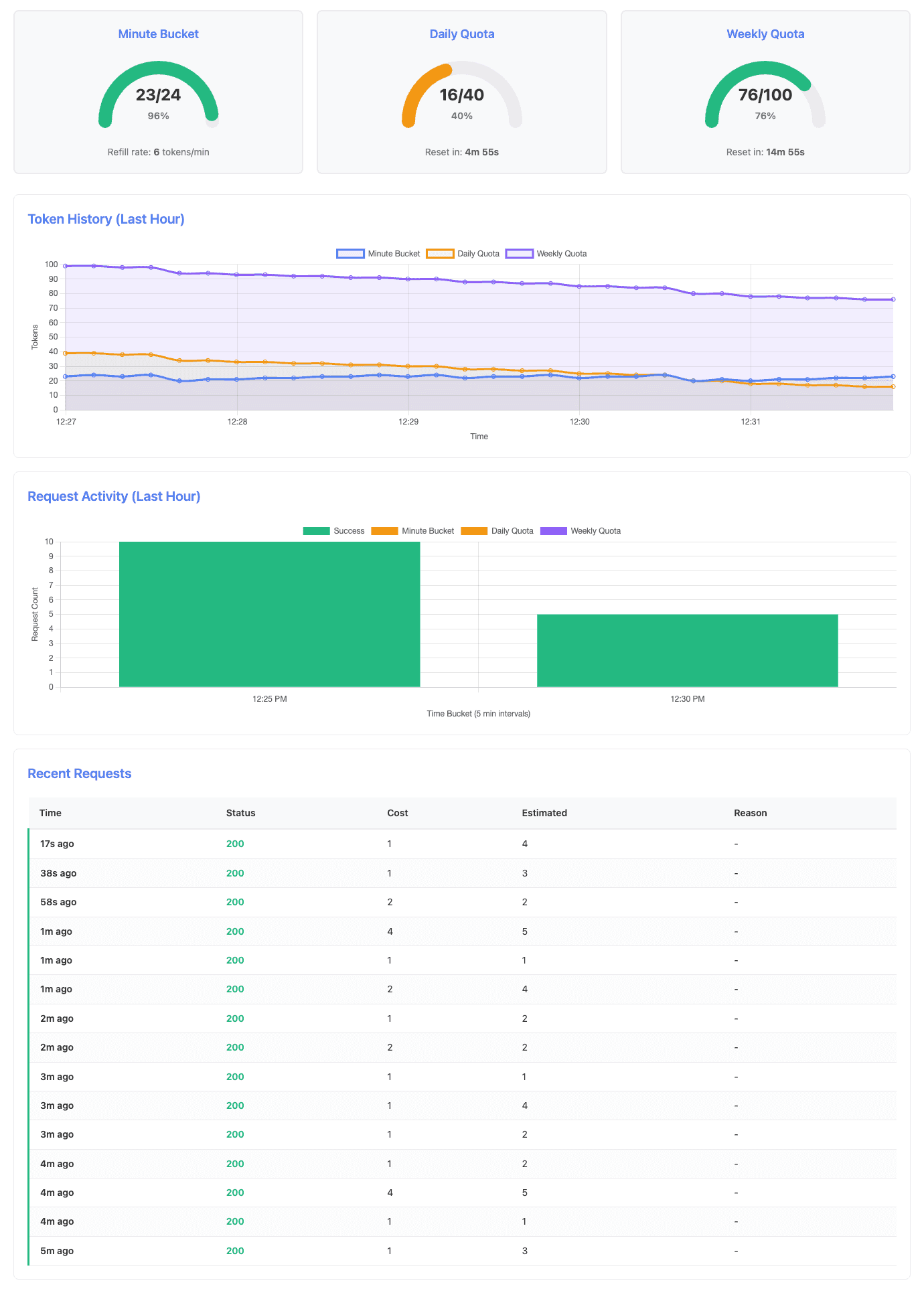
After 5 minutes, both quotas are healthy with daily quota showing first consumption:
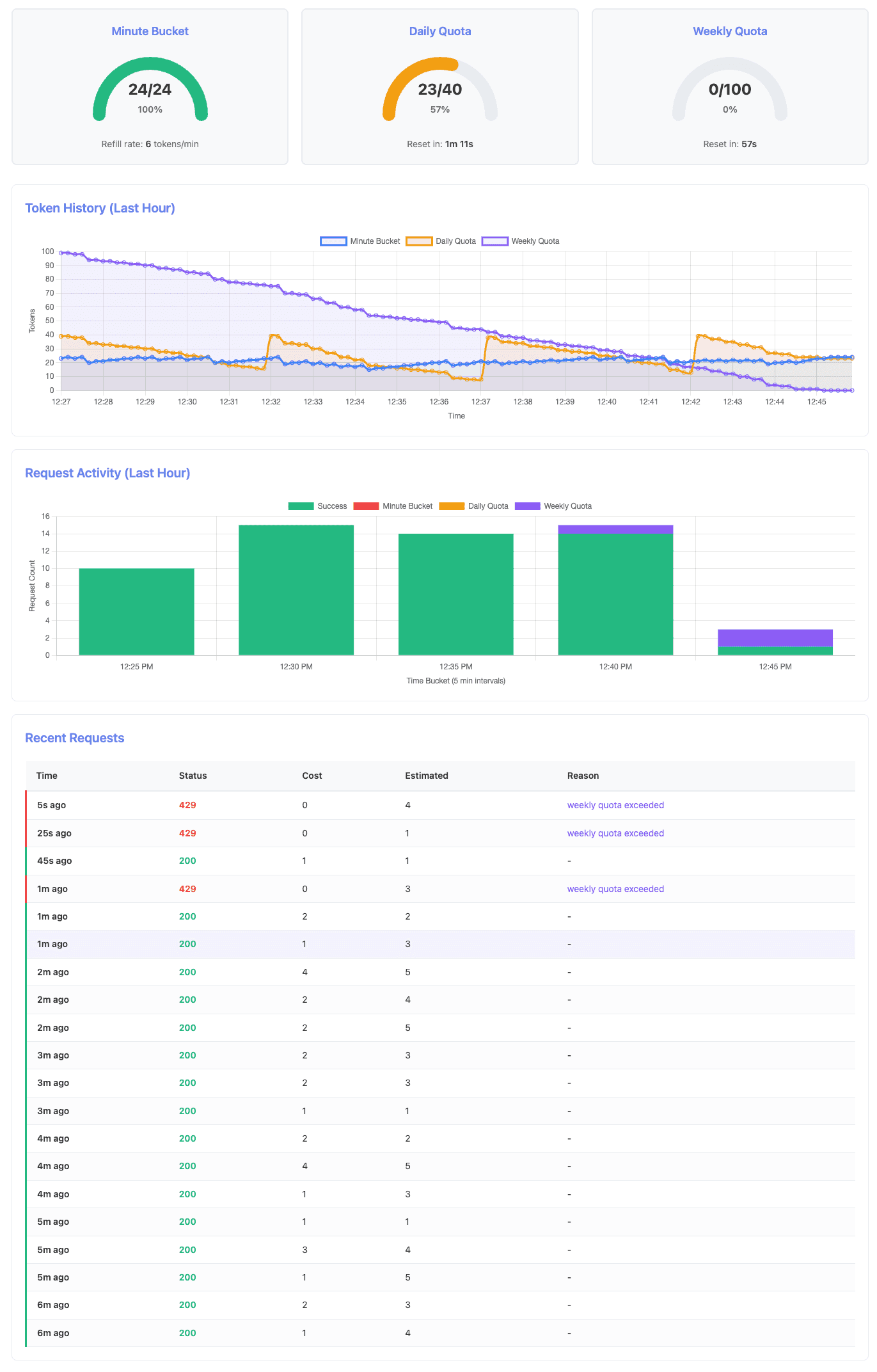
At the critical moment when weekly quota is exhausted but daily quota still has capacity:
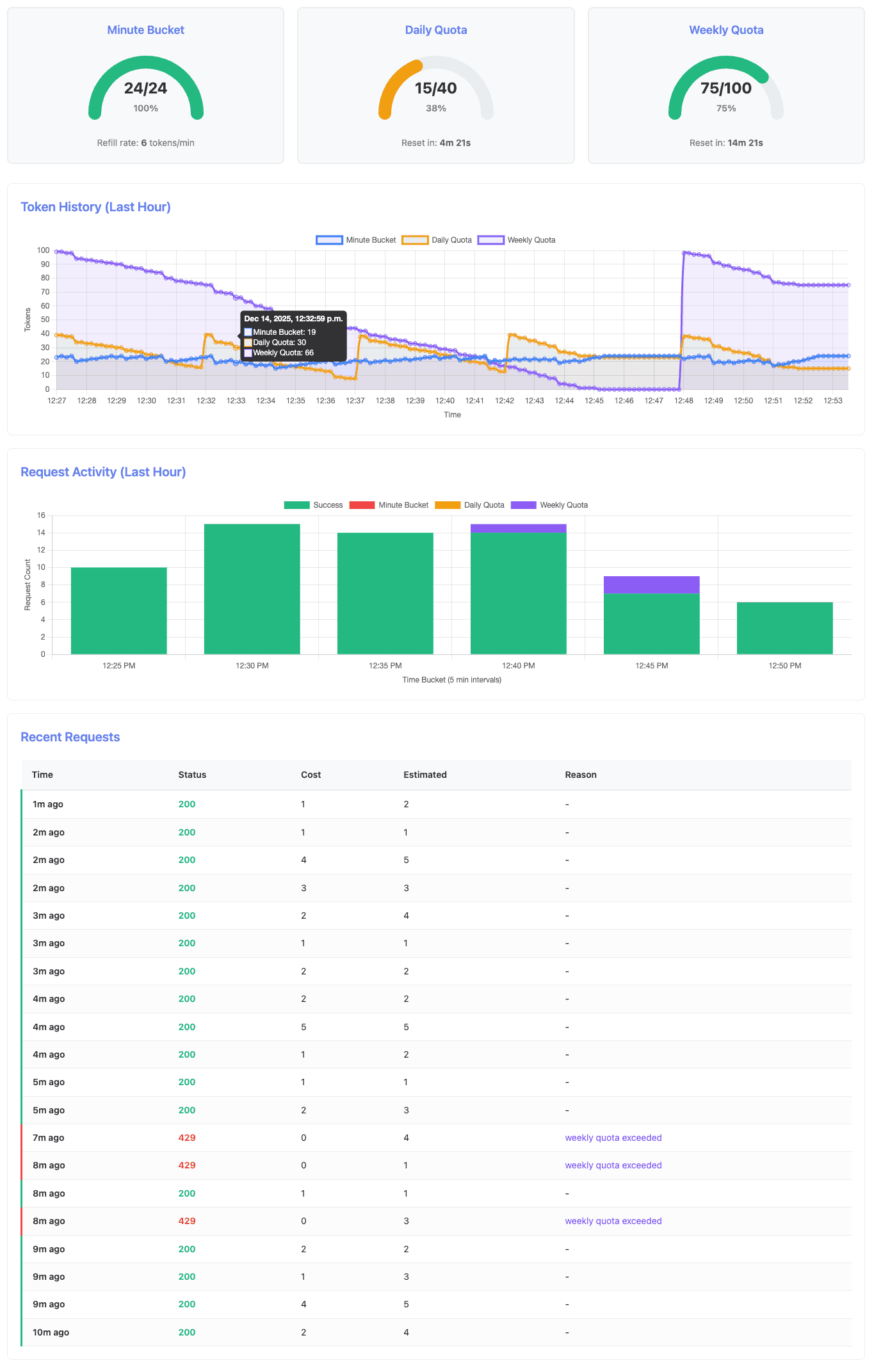
After both quotas reset and the system fully recovers:
Key observations from the k6 log output:
INFO[0305] Daily quota reset detected: 16 -> 39
INFO[0609] Daily quota reset detected: 8 -> 38
INFO[0914] Daily quota reset detected: 13 -> 39
INFO[0995] Weekly quota low: 8 tokens remaining
INFO[1056] Weekly quota low: 1 tokens remaining
INFO[1076] Request made during EXHAUST, status: 429
INFO[1076] Weekly quota exhausted (~15-17 minute mark)
INFO[1076] CASCADING LIMIT DETECTED: Weekly blocks despite 24 daily tokens available
INFO[1117] CASCADING LIMIT DETECTED: Weekly blocks despite 23 daily tokens available
INFO[1267] Daily quota reset detected: 23 -> 38
INFO[1267] Weekly quota reset detected: 98 tokens available
The log reveals several critical moments:
- Multiple daily resets: At around 5, 10, and 15 minutes, the daily quota resets (16→39, 8→38 and 13→39) while requests continue to succeed
- Weekly exhaustion: At 1076 (≈18 minutes), weekly quota hits zero and requests begin failing with 429 status
- Cascading enforcement: At 1076 and 1117 (≈18-19 minutes), the system explicitly detects that weekly quota is blocking requests despite daily quota having 23-24 tokens available - this is the key demonstration of hierarchical enforcement
- Full recovery: At 1267 (≈21 minutes), both quotas reset and requests succeed again
Key Learning: The hierarchical limit enforcement ensures that weekly quota acts as the ultimate cost ceiling. Even when daily quota resets, exhausted weekly quota continues to block requests. This prevents sophisticated attacks where users try to game the system by timing requests around daily reset windows.
Summary
This hands-on implementation demonstrates how to build rate limiting for GenAI APIs with multiple protection layers:
Architectural Takeaways:
- Multi-level protection is essential: minute-level rate limiting handles bursts, daily quotas prevent sustained abuse, and weekly quotas provide ultimate cost ceilings
- Hierarchical enforcement prevents gaming: all layers must approve a request, making it impossible to exploit reset timing
- Optimistic locking with refunds enables accurate cost tracking even when exact costs are only known post-generation
- Redis-backed state provides atomic operations and distributed consistency for production deployments
Implementation Insights:
- Token bucket continuous refill is more granular than discrete intervals, improving user experience during legitimate bursts
- Automatic quota resets reduce operational overhead - no manual intervention needed
- Background metrics collection enables real-time observability without impacting request performance
- Cost estimation with true-up accounting (provisional reservation + correction) handles unpredictable GenAI costs
The complete project code, including FastAPI implementation, Redis storage layer, k6 load tests, and dashboard visualization, is available at https://github.com/handsonarchitects/denial-of-wallet-demo.
We encourage you to clone the repository, run the scenarios, and experiment with different configurations:
- Adjust bucket capacity and refill rates to see burst behavior change
- Modify quota windows to match your business requirements
- Add new scenarios to test edge cases specific to your application
- Extend the implementation with per-user quotas, priority tiers, or cost-based pricing
Final Thoughts
Building cost-aware rate limiting is no longer optional for production GenAI applications. The unpredictable cost variability of agentic workflows, combined with the ease of programmatic access, makes Denial of Wallet attacks a real and present risk. Start with the patterns demonstrated in this series, measure your actual usage, and tune the limits to protect your budget while serving legitimate users effectively.