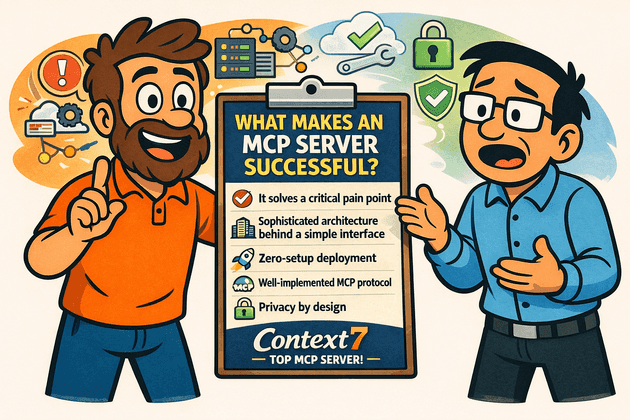
The rise of MCP: A new standard for AI integration
When Anthropic introduced the Model Context Protocol (MCP) in late November 2024, they pitched it with a simple but powerful analogy: MCP is the "USB-C port of AI applications." Just as USB-C created a universal connection standard for physical devices, MCP creates a universal extension point for Large Language Models (LLMs). It lets LLMs connect to external tools and data sources — databases, search engines, ticketing systems, and countless others — in a standardized way.
Before MCP, every AI application needed custom connectors for each external system — 5 AI tools and 100 services meant 500 potential integrations. MCP turned this M×N problem into an M+N one: each AI tool implements the MCP client protocol once, each service implements the MCP server protocol once, and they all interoperate seamlessly.
What happened next surprised even MCP's creators. In November 2024, Anthropic open-sourced the protocol with comprehensive specifications, SDKs for Python, TypeScript, Java, Kotlin, and C#, and reference implementations.
Then adoption accelerated rapidly. Cursor, Windsurf, and Claude Code added support in early 2025. By April, VS Code, GitHub, and OpenAI had all adopted MCP. Cloud infrastructure providers like AWS, Google Cloud, and Microsoft Azure integrated it into their AI offerings. Even specialized tools like Figma and Stripe built their own MCP servers.
But with thousands of MCP servers now in existence, a critical question emerges: what sets the truly successful ones apart from the thousands that remain unused? To answer that, we need to look at where successful MCP servers live, what problems they solve, and how they are built.
Successful MCP servers: Where to find them
The MCP ecosystem has grown so rapidly that several dedicated directories have emerged to help developers discover MCP servers. MCP Hub, mcpmarket.com, glama.ai/mcp, and aiagentslist.com/mcp-servers all curate collections of available servers with descriptions, installation instructions, and usage statistics.
But raw counts of MCP servers tell only part of the story. The more interesting question is which servers have actually earned developer trust. When we rank MCP servers by GitHub stars, a clear picture of the ecosystem's leaders emerges:
| Rank | MCP Server | GitHub Stars | Description |
|---|---|---|---|
| 1 | upstash/context7 | 44,000+ | Up-to-date documentation for AI coding assistants (as of January 2026) |
| 2 | mindsdb/mindsdb | 30,000+ | AI integration with databases |
| 3 | 1Panel-dev/1Panel | 25,000+ | Server management platform |
| 4 | github/github-mcp-server | 20,000+ | GitHub repository interaction |
| 5 | microsoft/playwright-mcp | 15,000+ | Browser automation for AI |
Context7, developed by Upstash, stands out with a substantial lead of over 44,000 GitHub stars and over 240,000 weekly npm downloads. That kind of adoption doesn't happen by accident. Context7 has found genuine product-market fit — solving a problem that developers encounter daily and solving it well enough that adoption grows organically.
This makes Context7 an ideal case study for understanding what makes an MCP server successful. The following sections examine the problem it solves, the architecture behind it, how it implements the MCP protocol, and the key factors that drove its adoption.
Context7: What problem does it solve?
Every developer who has used an AI coding assistant has experienced the same frustration. You ask the AI to generate code for a library you are working with, and what comes back looks convincing — but doesn't compile. The method names are wrong. The API has changed since the model was trained. The code mixes patterns from two different major versions of the same framework. You end up spending more time debugging the AI's output than you would have spent writing the code yourself.
This frustration arises from four fundamental problems that affect AI coding assistants today.
Outdated training data
Large Language Models are trained on documentation snapshots that are typically 6 to 12 months behind the current releases. If you are working with Spring Boot 3.5, but the AI was trained on Spring Boot 2.7 documentation, it confidently generates code using patterns, annotations, and configuration styles that are outdated or deprecated.
Hallucinated APIs
The most frustrating problem is when the AI confidently suggests methods, classes, or annotations that don't exist. You paste the generated code into your IDE, it doesn't compile, and you waste time debugging phantom APIs that the model fabricated from patterns it learned during training. For example, a model might suggest a JUnit 5 annotation like @TestOrder that looks perfectly reasonable but was never part of the JUnit API.
Generic answers without specifics
When you ask an AI how to implement OAuth2 in your application, you often get a high-level explanation that reads more like a textbook than working code. "Use Spring Security's OAuth2 support" is technically correct but practically useless when you need the specific configuration classes, filter chain setup, and property values for your framework version.
Version conflicts
The AI frequently mixes APIs from different library versions in the same code snippet, combining deprecated methods alongside current ones. This creates code that is broken from the start — perhaps using javax.persistence annotations in a Spring Boot 3.x project that requires jakarta.persistence, or mixing Spring Security's old WebSecurityConfigurerAdapter pattern with the newer SecurityFilterChain approach.
How Context7 solves this
Context7 addresses all four problems with a straightforward approach: it gives AI coding assistants real-time access to the latest official documentation and code examples. Instead of relying on what the model memorized during training, Context7 pulls current, version-specific documentation from framework source repositories and injects it directly into the LLM's context window at the moment of prompting. The AI then generates code based on this fresh, authoritative information rather than its outdated training data.
The significance of this approach hasn't gone unnoticed by the industry. ThoughtWorks Technology Radar recently added Context7 to its "Tools" section, noting:
Context7 is an MCP server that addresses inaccuracies in AI-generated code. While LLMs rely on outdated training data, Context7 ensures they generate accurate, up-to-date and version-specific code for the libraries and frameworks used in a project. It does this by pulling the latest documentation and functional code examples directly from framework source repositories and injecting them into the LLM's context window at the moment of prompting.
Context7 benefits more than individual developers writing code. Automated code review tools produce better suggestions when they access current documentation. AI code assistants like Cursor, Windsurf, and Claude Code generate more accurate output. Even teams performing large-scale code migrations between framework versions benefit, because Context7 ensures the AI understands the specific APIs available in both the source and target versions.
Architecture behind Context7
Understanding why Context7 performs well requires looking beneath the surface at the Upstash platform that powers it. Context7 is a Software as a Service (SaaS) product, and like any successful SaaS, its architecture must balance competing concerns: scalability, resilience, performance, agility, and cost-effectiveness. Upstash's architects made design choices that reveal how they prioritized and resolved these concerns.
High-level architecture
Context7's architecture is built around a pipeline that transforms raw documentation from thousands of GitHub repositories and documentation sites into AI-optimized code snippets that can be retrieved in milliseconds.
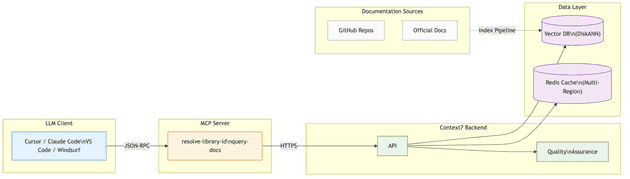
The system comprises several interconnected components:
- LLM Client — The AI application (Cursor, Windsurf, Claude Desktop, Claude Code) that needs documentation context.
- Context7 MCP Server — The protocol adapter that translates MCP tool calls into Context7 API requests.
- API Backend — The service layer that orchestrates library resolution and documentation retrieval.
- Upstash Vector Database — Stores processed documentation as vector embeddings using the DiskANN (Disk-based Approximate Nearest Neighbor) algorithm. DiskANN keeps indexes on disk rather than RAM, enabling cost-effective semantic search across 33,000+ libraries.
- Redis Caching Layer (Upstash Global Database) — A multi-region distributed cache for frequently accessed documentation, providing sub-millisecond reads from the nearest region.
- Quality Assurance System — Validation and scoring infrastructure that ensures documentation quality through source reputation, benchmark scoring, and injection prevention.
Scalability and elasticity
For a system serving thousands of concurrent developers across the globe, scalability is essential. Context7 needs to handle not just steady growth in users, but also the bursty, unpredictable traffic spikes common in LLM-driven applications.
Upstash addresses this through a combination of serverless infrastructure and intelligent architectural choices. The vector database uses DiskANN and its variant FreshDiskANN (optimized for incremental index updates), which store vector indexes on disk rather than requiring everything in memory. This approach keeps memory requirements constant regardless of dataset size, allowing the system to scale to millions of documentation snippets without proportional cost increases.
Resilience and fault tolerance
Context7's caching layer uses Upstash Global Database — a multi-region Redis deployment where a primary region handles all writes while read replicas distributed globally serve read requests. If a region becomes unavailable, requests automatically route to the next-nearest region.
The caching layer uses eventual consistency, prioritizing read performance over immediate consistency. With documentation updated every 10 to 15 days, brief cache staleness during propagation is negligible.
Performance through server-side intelligence
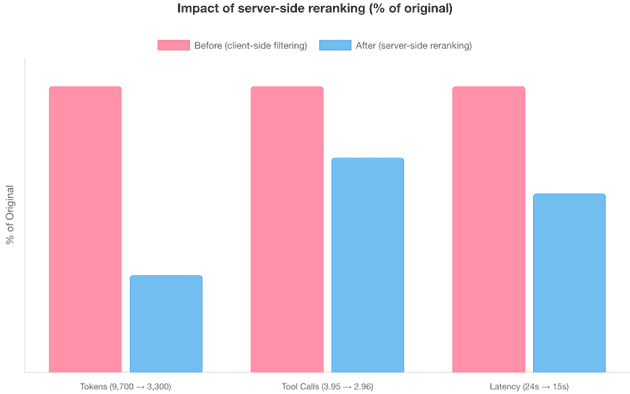
One of Context7's most impactful architectural decisions was moving documentation filtering and ranking from the LLM client to the server side. In the original architecture, the API returned 50-100 vector search results and left it to the LLM to filter and rank them — a process that averaged 9,700 tokens, 3.95 tool calls, and 24 seconds of latency.
The current architecture performs vector search plus server-side reranking (re-ordering results by relevance) using a proprietary 5-metric scoring system. The result: an average of just 3,300 tokens, 2.96 tool calls, and 15 seconds of latency — a 65% reduction in token consumption and 38% reduction in latency. The server does more work per request, but that work uses specialized, cost-efficient models rather than expensive general-purpose LLMs.
Agility and cost-effectiveness
Context7 is composed of multiple focused components — the MCP server, the API backend, the indexing pipeline, the quality assurance system — each of which can be iterated and deployed independently. Moreover, each can be scaled independently based on demand. Combined with Upstash's serverless infrastructure, each component scales with demand without overprovisioning, and costs scale with actual usage rather than reserved capacity.
How Context7 implements the MCP protocol
This is where we move from "what" to "how." Understanding Context7's MCP implementation reveals the engineering decisions that make it responsive, reliable, and LLM-friendly.
The MCP data layer
The Model Context Protocol defines three core primitives that MCP servers can expose to LLM clients:
- Tools — Functions that AI models can invoke, such as querying databases, calling APIs, or performing computations.
- Resources — Data that provides context to language models, such as files, database schemas, or application-specific information.
- Prompts — Predefined templates or instructions that guide the language model's responses.
Context7 exposes a minimal MCP interface:
| Primitive | Implementation | Description |
|---|---|---|
| Tools | resolve-library-id |
Resolves a package name to a Context7-compatible library ID |
| Tools | query-docs |
Retrieves up-to-date documentation and code examples for a library |
| Resources | empty | No resources exposed |
| Prompts | empty | No prompts exposed |
This minimalism is a design choice, not a limitation. By providing just two focused tools, Context7 keeps the integration surface small and predictable. LLM clients don't need to navigate a complex menu of capabilities — they resolve a library and query its documentation. That's it.
Inspecting the MCP implementation
You can examine Context7's MCP implementation yourself using the MCP Inspector, an interactive debugging tool for MCP servers. Run the following command to launch the inspector connected to Context7:
npx -y @modelcontextprotocol/inspector npx -y @upstash/context7-mcp
# Opens MCP Inspector at http://localhost:5173
This command opens a browser-based inspector at http://localhost:5173 that shows the complete MCP handshake — the initialization exchange, capability negotiation, tool definitions — and lets you invoke tools interactively to see their responses. It's an invaluable tool for understanding how any MCP server works internally.
Protocol layers: What the LLM sees vs. what the server hides
Context7's communication architecture operates across two distinct layers, and understanding this separation is key to understanding MCP's design philosophy.
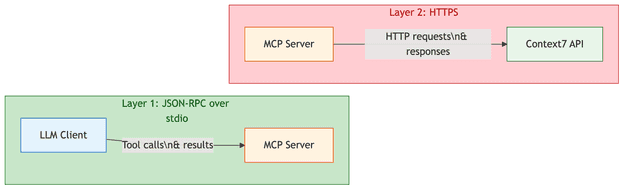
Layer 1: JSON-RPC (JSON Remote Procedure Call) over stdio (standard input/output) — This is what the LLM client (Claude, Cursor, etc.) directly interacts with. The client sends JSON-RPC 2.0 messages containing tool names and parameters, and receives structured text responses. The LLM sees tool names, request parameters, tool results, and error messages — nothing else.
Layer 2: HTTPS to Context7 Backend — This is what the MCP server handles internally. It translates JSON-RPC tool calls into HTTP requests to Context7's API, manages authentication headers, handles response codes, and measures latency. None of this is visible to the LLM.
| Component | Visible to LLM? | Details |
|---|---|---|
Tool name (resolve-library-id, query-docs) |
Yes | JSON-RPC method name |
| Request parameters (JSON) | Yes | libraryName, query, libraryId |
| Tool result (formatted text) | Yes | Library data or documentation snippets |
| HTTP URL called by MCP server | No | Abstracted by MCP server |
| HTTP response codes | No | Abstracted by MCP server |
| Request headers and authentication | No | Abstracted by MCP server |
| Network latency | No | Abstracted by MCP server |
The MCP server handles all the complexity of communicating with the Context7 API, allowing the LLM to focus solely on generating accurate queries and interpreting results.
MCP lifecycle: Tool discovery
After initialization, the client calls tools/list to discover available tools. Context7's response reveals two tools — resolve-library-id and query-docs — with descriptions that are unusually detailed and prescriptive for an MCP server. This is intentional: the descriptions function as behavioral instructions for the LLM. Several aspects stand out:
Privacy guardrails embedded in the schema. Both tools include explicit warnings in their parameter descriptions: "IMPORTANT: Do not include any sensitive or confidential information such as API keys, passwords, credentials, or personal data in your query." This is a defensive design choice — because query text is sent to Context7's API, the tool description itself acts as a privacy firewall, instructing the LLM to strip sensitive content before making the call.
Call frequency limits. Both descriptions include: "IMPORTANT: Do not call this tool more than 3 times per question." This prevents the LLM from entering retry loops that would waste tokens and API quota while degrading user experience.
Structured selection criteria. The resolve-library-id description prescribes a ranked selection process for the LLM: name similarity (exact matches first), description relevance, documentation coverage (higher snippet counts preferred), source reputation, and benchmark score (0-100 quality indicator). It even specifies the response format — the LLM should explain why it chose a particular library and acknowledge when multiple good matches exist.
Query quality guidance. The query-docs tool provides explicit examples of good queries ("How to set up authentication with JWT in Express.js") versus bad ones ("auth", "hooks"), coaching the LLM to generate specific, context-rich searches.
MCP annotations. Both tools include "annotations": { "readOnlyHint": true } and "execution": { "taskSupport": "forbidden" }, signaling to the client that these tools only read data and should not be used in background task execution.
API endpoints
Behind the MCP protocol layer, Context7's server communicates with exactly two HTTP API endpoints. These are the real workhorses of the system.
Endpoint 1: Library resolution
This endpoint powers the resolve-library-id tool. It performs fuzzy matching and LLM-based relevance ranking to find libraries matching a developer's query.
| Field | Value |
|---|---|
| URL | https://context7.com/api/v2/libs/search |
| Method | GET |
| Authentication | Optional (Bearer token with ctx7sk_ prefix) |
Query Parameters:
| Parameter | Type | Required | Description |
|---|---|---|---|
query |
string | Yes | The user's original question, used for relevance ranking |
libraryName |
string | Yes | The library name to search for |
Example Request:
GET /api/v2/libs/search?query=How+to+create+a+REST+API+in+Spring+Boot+3.5&libraryName=Spring+Boot HTTP/1.1
Host: context7.com
Authorization: Bearer ctx7sk_xxx...
X-Context7-Source: mcp-server
X-Context7-Server-Version: 1.0.23
X-Context7-Client-IDE: claude-code
X-Context7-Transport: stdio
The response returns an array of matching libraries, each with rich metadata that the LLM uses to select the best match:
{
  "results": [
    {
      "id": "/spring-projects/spring-boot",
      "title": "Spring Boot",
      "description": "Spring Boot helps you to create Spring-powered, production-grade applications...",
      "totalSnippets": 2446,
      "trustScore": 9,
      "benchmarkScore": 82.5,
      "versions": ["v3.4.1", "v3.5.3", "v3.5.9", "v4.0.0"],
      "state": "finalized"
    }
  ]
}
The trustScore field (0-10 scale) maps to a reputation label: scores of 7 or above are "High", 4-6 are "Medium", and below 4 are "Low". This scoring considers factors like organization age, repository portfolio, community size, and contributor count. It helps the LLM choose authoritative sources over potentially unreliable forks or clones.
Endpoint 2: Documentation retrieval
This endpoint powers the query-docs tool. It performs vector similarity search, applies server-side reranking, and returns formatted documentation snippets.
| Field | Value |
|---|---|
| URL | https://context7.com/api/v2/context |
| Method | GET |
| Authentication | Optional (Bearer token with ctx7sk_ prefix) |
| Response Format | Text (default for MCP) or JSON |
Query Parameters:
| Parameter | Type | Required | Description |
|---|---|---|---|
query |
string | Yes | The developer's question or task |
libraryId |
string | Yes | Context7-compatible library ID from resolve-library-id |
Response Headers:
| Header | Description |
|---|---|
x-context7-total-tokens |
Total token count in response |
x-context7-total-pages |
Total number of pages |
x-context7-has-next |
Whether more pages exist |
The response contains formatted documentation snippets with code examples, each including a title, description, source URL, and language-tagged code block — ready for the LLM to incorporate into its answer.
Request headers and authentication
Every request from the MCP server to Context7's API includes a set of headers that serve both operational and security purposes:
| Header | Required | Purpose |
|---|---|---|
X-Context7-Source |
Yes | Identifies the request source (mcp-server) |
X-Context7-Server-Version |
Yes | MCP server version for compatibility tracking |
Authorization |
No | Bearer ctx7sk_xxx for authenticated access |
mcp-client-ip |
No | AES-256-CBC encrypted client IP for rate limiting |
X-Context7-Client-IDE |
No | Which IDE is making the request (e.g., claude-code, Cursor) |
X-Context7-Transport |
No | Transport type (stdio, http, sse) |
The encrypted client IP header deserves special mention. Context7 uses AES-256-CBC encryption to prevent header spoofing — a technique where unauthorized users could bypass rate limiting by sending a different IP address with each request. The encryption key is shared only between the MCP server and the API backend, so forged headers are immediately detectable.
Further reading: Rate limiting in agentic workflows introduces unique challenges — AI agents can generate bursts of requests that look nothing like human traffic. We explore cost-aware rate limiting strategies for such scenarios in Denial of Wallet — Cost-Aware Rate Limiting.
The request flow in action
Consider a complete request flow for a developer asking: "How to create a REST API in Spring Boot 3.5?"
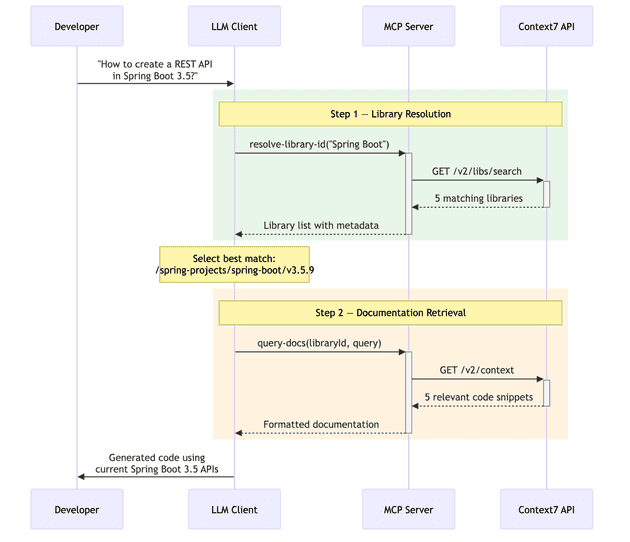
Step 1: Library Resolution. The LLM calls resolve-library-id with libraryName: "Spring Boot" and query: "How to create a REST API in Spring Boot 3.5?". The MCP server translates this into a GET /v2/libs/search request. The API returns five matching libraries, including the official Spring Boot repository (/spring-projects/spring-boot) with a benchmark score of 82.5 and "High" source reputation.
The LLM evaluates the candidates and selects /spring-projects/spring-boot/v3.5.9 — choosing the latest 3.5.x version that matches the developer's request.
Step 2: Documentation Retrieval. The LLM calls query-docs with the selected library ID and the original query. The MCP server translates this into a GET /v2/context request. The API performs vector similarity search, applies server-side reranking, and returns five relevant code snippets demonstrating REST API creation in Spring Boot. These snippets include a complete create, read, update, delete (CRUD) example with @RestController, @RequestMapping, proper HTTP status codes, and error handling.
Step 3: Code Generation. The LLM combines the retrieved documentation with the original prompt and any existing code context to generate a response using current Spring Boot 3.5 APIs.
The entire workflow completed with just 2 MCP tool calls — the minimum possible for a query where the library name needs resolution.
Performance and quality in practice
Performance metrics and quality experiments tell us whether Context7's architecture delivers on its promises. This section presents measurements of API response times, caching behavior, scalability, and response quality across multiple programming languages.
API performance analysis
To understand how Context7 performs under real-world conditions, we conducted a series of experiments measuring API response times, caching behavior, and scalability under concurrent load. All measurements were made using direct HTTP calls to the Context7 API endpoints.
Caching behavior
We called each endpoint four times with the same query to observe caching effects:
/v2/libs/search — Library Resolution:
| Call | Type | Response Time |
|---|---|---|
| 1 | Cold (first) | 1.321s |
| 2 | Warm (repeat) | 1.377s |
| 3 | Warm (repeat) | 1.085s |
| 4 | Warm (repeat) | 1.301s |
| Average | 1.271s |
/v2/context — Documentation Retrieval:
| Call | Type | Response Time |
|---|---|---|
| 1 | Cold (first) | 1.183s |
| 2 | Warm (repeat) | 0.950s |
| 3 | Warm (repeat) | 0.968s |
| 4 | Warm (repeat) | 1.282s |
| Average | 1.096s |
Response times remain consistent across repeated queries (1.08 to 1.38s range for search, 0.95 to 1.28s for context). The identical response sizes across warm calls suggest server-side caching is active. However, the LLM-based relevance ranking — which carries 80% weight in the reranking algorithm — must run on every request, even for cached results, preventing dramatic cache-hit speedups.
Concurrent user simulation
To test scalability, we fired 10 parallel unique queries at each endpoint, simulating 10 active users querying different libraries simultaneously:
/v2/libs/search — 10 Parallel Queries:
| Library | Response Time |
|---|---|
| Spring Boot | 0.978s |
| Kubernetes | 1.364s |
| Express | 1.482s |
| Next.js | 1.498s |
| React | 1.513s |
| MongoDB | 1.568s |
| PostgreSQL | 1.688s |
| Django | 1.892s |
| Vue.js | 1.896s |
| Redis | 2.053s |
| Average | 1.593s |
/v2/context — 10 Parallel Queries:
| Library | Response Time | Response Size |
|---|---|---|
| Prisma | 1.272s | 3,716 bytes |
| Next.js | 1.278s | 4,124 bytes |
| React | 1.369s | 5,119 bytes |
| MongoDB | 1.371s | 5,224 bytes |
| Express | 1.391s | 5,840 bytes |
| Kubernetes | 1.407s | 10,595 bytes |
| Django | 1.585s | 3,122 bytes |
| Vue.js | 1.588s | 8,131 bytes |
| PostgreSQL | 1.667s | 4,695 bytes |
| Spring Boot | 1.686s | 6,325 bytes |
| Average | 1.461s |
The results show that Context7 handles concurrent queries with only a modest increase in response time — averaging around 1.5 seconds for both endpoints under 10 parallel requests. This suggests that the system's architecture effectively manages load without significant degradation in performance.
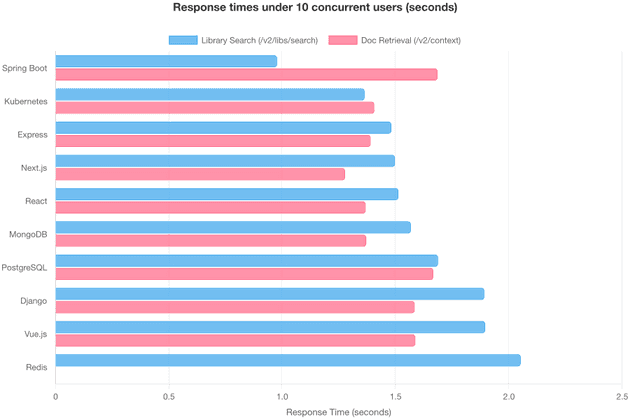
Notably, response size doesn't strongly correlate with response time — Kubernetes returned the largest response (10.6 KB) but wasn't the slowest, suggesting the bottleneck is server-side processing (e.g., 5-step ranking algorithm) rather than data transfer.
Full end-to-end workflow
A complete workflow (resolve library + fetch documentation) takes:
| Workflow | Library Resolution | Documentation Retrieval | Total |
|---|---|---|---|
| Spring Boot REST API | 1.174s | 1.512s | 2.717s |
| React Hooks | 1.459s | 0.978s | 2.471s |
| Next.js Routing | 1.095s | 1.181s | 2.309s |
| Average | 2.499s |
A developer can expect approximately 2.3 to 2.7 seconds for a complete Context7 query when the library name needs resolution. If the library ID is provided directly (skipping resolution), the time drops to just the documentation retrieval phase — roughly 1 second.
API key vs. anonymous access
Context7 offers both authenticated (API key) and anonymous access. Their documentation states that API keys provide "higher rate limits, priority access during peak usage, and better performance for frequent queries." We tested whether this holds true in practice.
| Metric | Without API Key | With API Key | Difference |
|---|---|---|---|
| Search API (single user avg) | 1.41s | 1.38s | API key ~2% faster |
| Context API (single user avg) | 1.14s | 1.38s | Anonymous 17% faster |
| Search API (10 concurrent avg) | 1.58s | 1.75s | Anonymous 10% faster |
| Context API (10 concurrent avg) | 1.40s | 1.68s | Anonymous 17% faster |
| Full workflow (avg) | 2.32s | 2.81s | Anonymous 17% faster |
| Response time consistency | Higher variance | Lower variance | API key more consistent |
The results were counterintuitive. Anonymous requests were generally faster in our tests, while API key requests showed more consistent response times with lower variance. This suggests that API key validation adds a small overhead to each request, and the "priority access" benefit likely applies during actual peak usage periods rather than the normal load conditions of our experiment.
The primary value of an API key isn't raw speed but rather higher rate limits (free plan: 1,000 API calls/month; pro plan: 5,000/seat/month) and more predictable behavior under heavy load. For production use with frequent queries, an API key is essential to avoid rate limits.
Response quality: Experiments across languages and topics
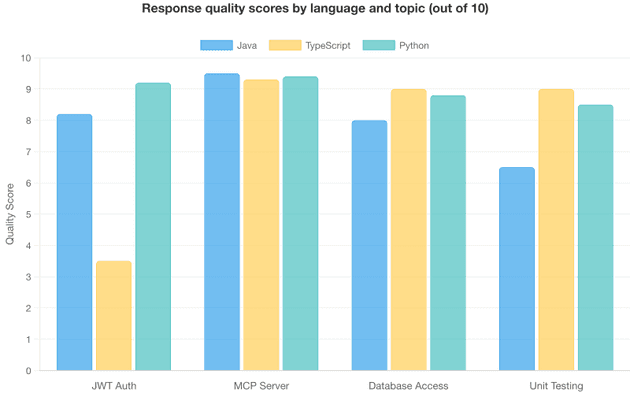
Performance metrics tell us how fast Context7 responds, but they say nothing about the quality of what it returns. To evaluate this, we conducted 12 experiments across three programming languages (Java, TypeScript, Python) and four topics (JWT Authentication, MCP Server Implementation, Database Access, Unit Testing).
Each experiment was scored on accuracy, version specificity, code quality, completeness, and relevance, yielding an overall score out of 10.
Results by experiment
The following table shows individual scores for each language-topic combination. Scores of 8.0+ indicate production-ready responses; scores below 6.0 signal that the queried library lacked sufficient coverage for the topic.
| # | Language | Topic | Library Used | Score | Verdict |
|---|---|---|---|---|---|
| 1 | Java | JWT Authentication | Spring Security 6.5 | 8.2 | Excellent |
| 2 | TypeScript | JWT Authentication | Express.js 5.1.0 | 3.5 | Poor |
| 3 | Python | JWT Authentication | FastAPI | 9.2 | Excellent |
| 4 | Java | MCP Server | Java SDK | 9.5 | Excellent |
| 5 | TypeScript | MCP Server | TypeScript SDK | 9.3 | Excellent |
| 6 | Python | MCP Server | Python SDK | 9.4 | Excellent |
| 7 | Java | Database Access | Spring Data JPA | 8.0 | Good |
| 8 | TypeScript | Database Access | Prisma ORM | 9.0 | Excellent |
| 9 | Python | Database Access | SQLAlchemy 2.0 | 8.8 | Excellent |
| 10 | Java | Unit Testing | JUnit 5 | 6.5 | Fair |
| 11 | TypeScript | Unit Testing | Vitest | 9.0 | Excellent |
| 12 | Python | Unit Testing | pytest | 8.5 | Good |
Most experiments scored in the "good to excellent" range (8.0+), with the notable exception of TypeScript JWT Authentication (3.5) — a clear outlier that highlights Context7's limitations when the queried functionality lives in separate libraries rather than the main framework.
Key quality observations
What works well: Context7 excels when a single library contains comprehensive documentation for the queried topic. MCP Server implementation scored 9.4 on average because each SDK's documentation directly covers the topic. Python consistently scored highest (8.98 average) because Python frameworks like FastAPI, SQLAlchemy, and pytest tend to have well-structured, example-rich documentation.
Where it struggles: Context7 performs best when the queried functionality is documented within a single library. The lowest score (3.5) came from asking Express.js about JWT authentication — but JWT functionality lives in separate libraries like jsonwebtoken or passport-jwt, not in Express core. Similarly, the JUnit 5 experiment (6.5) missed Mockito and Spring Boot test integration because those capabilities live in separate libraries.
The lesson: search for the specific library that implements the feature, not the framework that hosts it. Decompose cross-library queries into separate searches — for example, search for "jsonwebtoken JWT implementation" and "Express middleware integration" separately. This reflects Context7's design principle of indexing libraries, not conceptual knowledge graphs.
Overall quality: 50% of experiments scored 9.0 or above, 75% scored 8.0 or above, and only one experiment scored below 6.0. The average across all 12 experiments was 8.16 out of 10 — a strong result that positions Context7 in the "good to excellent" range, while revealing that it isn't a universal solution for cross-library integration questions.
Five key factors that make Context7 successful
Having dissected Context7's architecture, protocol implementation, and performance characteristics, we can now identify the factors that separate it from the thousands of MCP servers that never gain traction.
1. It solves a critical pain point
Every developer using an AI coding assistant encounters hallucinated APIs, outdated patterns, and version conflicts. Context7 doesn't require changing your workflow — it makes your existing tools produce better output by giving them access to current documentation. It solves one problem well and accepts the trade-off: cross-library questions require multiple searches, but single-library queries are fast and accurate.
2. Sophisticated architecture behind a simple interface
Context7's two-tool interface hides a five-stage quality pipeline (parse, enrich, vectorize, rerank, cache) detailed in the Architecture behind Context7 section. Each stage contributes to the result quality that users experience. The key architectural bets — DiskANN for cost-effective vector storage, server-side reranking to reduce token consumption, and multi-region caching for low-latency reads — allow the system to serve 33,000+ libraries economically while maintaining sub-3-second response times and an 8.16/10 quality score across our experiments.
3. Zero-setup deployment
For most developers, setup is a single line in their MCP client's configuration file (for example, .cursor/mcp.json for Cursor or claude_desktop_config.json for Claude Desktop):
{
  "mcpServers": {
    "context7": {
      "command": "npx",
      "args": ["-y", "@upstash/context7-mcp"]
    }
  }
}
This zero-friction onboarding is critical — every additional setup step is a point where potential users drop off.
4. Well-implemented MCP protocol
As the implementation analysis showed, Context7's two tools follow a logical two-phase workflow with carefully crafted descriptions, clear parameter semantics, privacy warnings, and usage constraints. The server handles errors gracefully with actionable messages for common failure scenarios (rate limiting, invalid keys, library not found).
Context7 integrates seamlessly with all major MCP-compatible editors without special configuration or workarounds — exactly what a well-implemented protocol integration should do.
5. Privacy by design
In an era of growing concern about data privacy in AI tools, Context7 takes a clear architectural stance: your code never leaves your machine. The privacy model works as follows:
- The LLM client (running locally) reformulates the developer's prompt into a documentation query
- Only this reformulated query — not the original code or prompt — is sent to Context7
- Context7 returns documentation snippets without maintaining session history or user profiles
- The LLM uses the documentation to generate code, all happening locally
This stateless, query-only design means Context7 never has access to proprietary codebases, business logic, or sensitive application details. For enterprise teams evaluating MCP servers, this is often a deciding factor.
Conclusion
The MCP ecosystem has grown from a single protocol specification to thousands of server implementations in little over a year. But as our analysis of Context7 shows, building a successful MCP server requires more than implementing the protocol correctly. It requires solving a genuine, recurring problem; building an architecture that can deliver reliable, fast results at scale; keeping the integration surface small and focused; and respecting user privacy.
For architects and technical leaders considering building their own MCP servers, Context7 offers four lessons:
- Solve one problem exceptionally well. Focus is a strength, not a limitation.
- Invest in the invisible pipeline. Users never see the quality infrastructure, but they experience its results.
- Make adoption frictionless. Every step you eliminate between discovery and value is a step that would have cost you users.
- Respect user privacy. Stateless, query-only designs build the trust that enterprise adoption requires.
As the MCP ecosystem matures, the servers that thrive will be those that combine strong engineering foundations with clear, focused value propositions. Context7 shows what that combination looks like in practice.
TL;DR
Context7, built by Upstash, tops the MCP server ecosystem with 44,000+ GitHub stars and 240,000+ weekly npm downloads. It feeds AI coding assistants with fresh, version-accurate documentation so they stop generating code based on stale training data. ThoughtWorks Technology Radar now lists it in its "Tools" section.
The engineering choices behind it tell most of the story. Shifting documentation filtering from the LLM to the server reduced token usage by 65% and latency by 38%. DiskANN stores vector indexes on disk rather than in memory, so costs stay flat as the library count grows past 33,000. Multi-region Redis caching handles reads globally with low latency and eventual consistency that fits a 10-to-15-day documentation refresh cycle.
The entire MCP surface consists of two tools: resolve a library name, then fetch its docs. Tool descriptions carry embedded behavioral guidance for the LLM, including privacy warnings, a three-call-per-question cap, and examples of effective queries. Setup takes one line of JSON config.
Our performance tests showed full queries completing in roughly 2.5 seconds. With 10 concurrent users, response times rose only 25-33%. Anonymous access was slightly faster than API-key access in raw speed, though API keys delivered steadier response times and higher rate limits.
Quality scored 8.16 out of 10 across 12 experiments spanning Java, TypeScript, and Python. Single-library topics like MCP Server implementation averaged 9.4, while cross-library tasks such as Express.js JWT authentication dropped to 3.5 because the relevant code lives in separate packages. The takeaway: target the library that owns the feature, not the framework around it.
Five factors drove adoption: it addresses a pain developers face every day, it pairs deep infrastructure with a minimal interface, it requires zero setup, its tool descriptions steer LLM behavior precisely, and user code never leaves the local machine.